UHD/4K displays - NEC PA322UHD on my desk

UHD/4K monitors are the future, and partly the present already. They offer a much sharper image that looks far more like prints than what we'd been used to. It's no surprise that photographers in particular want them on their desks. Top-of-the-line models made specifically for photography are already available, but their prices are fairly overwhelming. Fortunately, more and more semi-professional and amateur models are appearing too.
A few years ago, I knew almost nothing about monitors. I thought you should buy the best lenses possible and a good camera, while any monitor would do as long as it had an IPS/S-PVA panel. Now I know that was complete stupidity, and it caused many problems that are still with me today (the portfolio photos need to be edited again). I wrote about all of this in my article on choosing a monitor for photographers. If you haven't read it, I recommend catching up.
Higher resolution - more detail
People had been asking me about UHD/4K monitors for a long time, and six months earlier I'd promised to test them in practice. Professional lines were very hard to get at the time, but things are better now. Today I can say with confidence that moving from standard resolutions to UHD is a huge leap. Nobody who's tried it claims otherwise. Even using Retina on Apple laptops is a completely different experience from using normal laptop screens, let alone seeing a similar difference on a screen over 30 inches instead of 15".
Below, I'm showing the difference between UHD and the popular 1920x1080/1920x1200, commonly called Full HD:


The pixel count is four times higher. Of course, I scaled this so the effect would be visible when viewed on ordinary monitors.
As you can see, the standard-resolution image looks pretty poor in this comparison. There's no denying that the resolution typical of 24-inch displays today (1920x1200) is very low. My 5.5-inch phone has that resolution. UHD is 3840x2160 pixels, while 4K is 4096x2160 px, far more than previous monitors offered (TVs sold as 4K are actually UHD rather than true 4K).
Let's go back in time a little. The revolution began several years ago with the MacBook Pro with Retina display, which packed 2800x1800 pixels into 15 inches. Because OS X handled scaling extremely well, the interface elements stayed the right size while the image became incredibly sharp. It wasn't UHD, but it looked impressive at 15 inches. [Of course, higher-resolution displays had existed before, but they were made for specialized applications such as medicine.]
With a laptop like that, a phone at the resolution of an average monitor, and a tablet at an even higher resolution, the image on a normal monitor simply looks blurry. This applies both to interface elements and to the graphics displayed on it. Photos edited in Photoshop normally have completely different sharpness from the later prints. The number of pixels per square inch on a monitor is much lower than the number of dots per square inch in prints. On UHD monitors, photos are displayed at the screen's native resolution, even when scaling is enabled. That means the same workspace contains four times as many pixels as normal, producing a much sharper image that's far closer to prints.
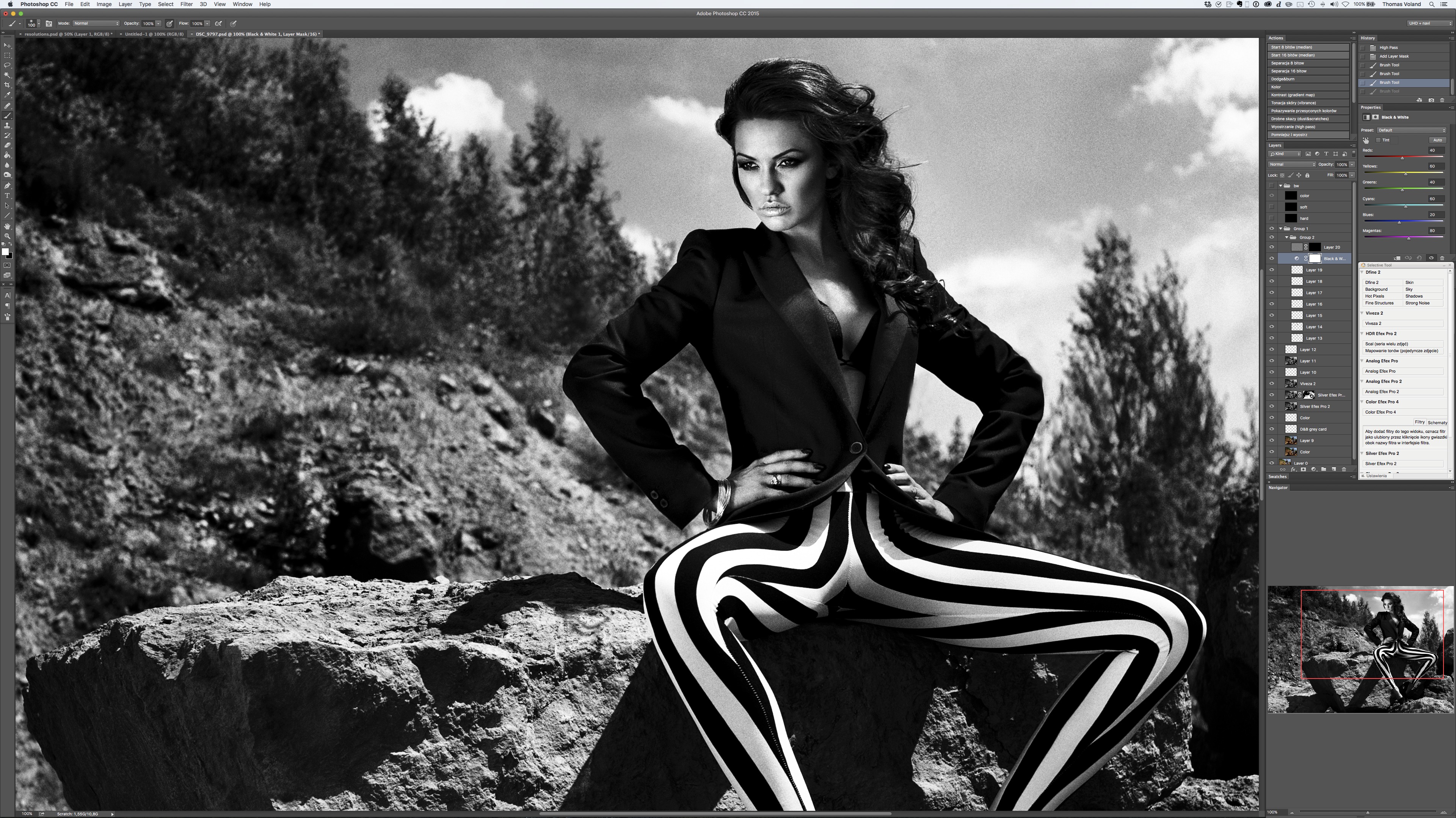
Photoshop at 3840x2160, with plenty of room to arrange the palettes
NEC PA322UHD - 32 inches in Ultra HD
In October, I flew to Poland for a month. During that time, I used the NEC PA322UHD, the best display for retouching that exists (or one of the two best, since there's also the Eizo CG318-4K, which is smaller but offers full 4K. I wrote more about it in my article on monitors for photo editing). It's also available in an option that adds a hood and a longer warranty, called SV Reference. In the past, PA and SV Reference differed greatly in quality. Those differences have now faded, but so has the difference in price. PA is now only slightly cheaper than SV Reference. That's why there's no intermediate model anymore (SV without the Reference suffix).
15" MacBook Pro Retina, NEC PA322UHD, and Wacom Intuos 5 size S
I'd previously had the chance to use the best normal-resolution monitors every day, and I have to admit that after using this NEC, I could never go back to them. It's not about quality. That was already very good. It's about resolution and size. 32 inches is really quite large by today's standards, although I have no doubt monitors will sooner or later become much larger. At the same time, 32 inches seems like the ideal compromise between size and sharpness at this resolution. Regular 30-inch monitors were a little sharper than 24-inch models but not as sharp as 27-inch ones (which, at 2560x1440, offered the smallest dot pitch and therefore the sharpest image). Sharpness on a 32-inch UHD display is much better than on any standard-resolution screen.
On a monitor like this, I can use the native resolution (3840x2160 px) without enabling scaling. Everything is still large enough, and the workspace is enormous. To put it in perspective, one such monitor has the same workspace as four 1920x1080 px monitors. The graphic below shows this perfectly:
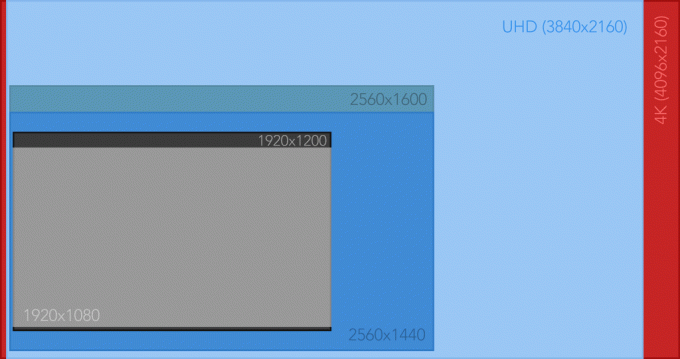
4K adds pixels on the sides compared with UHD. This results in a different screen aspect ratio.
Using the operating system itself is also incredibly convenient. Just look at how much room there is to arrange all the windows:
Desktop at 3840x2160 resolution. At 32", everything is large enough and easy to read
Remember that even if the interface elements look tiny on your screen, they're the right size on mine because of the screen's physical size. The interface is almost identical in size to Full HD displayed on 15 inches, which is just right for me because I use that display mode on my laptop every day (people with worse eyesight can enable scaling to make everything appropriately larger, although it doesn't work as perfectly on Windows as it does on macOS). This screen has more advantages, but there's probably no point in listing them. It simply meets all the requirements for photographic monitors, and no matter how hard I try, I'd struggle to find any fault with it. I can think of only one thing that could be improved at all: make the blacks even deeper. The current black isn't as dark as on plasma displays (no monitor can match that, and neither can any LCD/"LED" TV). That might matter when making movies, but not photos. For photography, it's more than enough. I really like the satin-finish panel in this display. I can't stand glossy screens and definitely prefer matte ones, but those have drawbacks too. The satin finish on the PA322UHD is the ideal compromise. People even more demanding than I am will consider this display perfect, so it would be hard for me not to be satisfied with it. Maybe someday there'll be another technological leap, such as a 42-inch OLED 8K display. Then we'll genuinely be able to say that something even better has been made. Until then, lower-end lines will probably appear at much more affordable prices (the EA275UHD and EA244UHD already exist).
Distance from the screen
If anyone is wondering how far away you sit from a display like this, the answer is the same distance as from a 24-inch monitor (about 60 cm in my case). You simply see less of the wall around it because more of the wall is blocked. It has no effect on eye strain because a monitor calibrated for photography strains the eyes no more than reading a book in good light. You don't need to turn your head to see the whole screen either.
Off topic
By the way, people have very strange hang-ups about viewing distance, probably left over from the days of CRT monitors, when sitting close was discouraged. Back then, various formulas were created to calculate distance based on the diagonal. For some completely nonsensical reason, some people try to follow similar guidelines with LCDs. I even mean TVs. People often watch a 50-inch TV from several meters away, where they can also see the entire cabinet it sits on, the audio equipment around it, and three quarters of the room. It has nothing to do with a movie theater experience. You might as well watch the movie on a 13-inch laptop placed closer to you. Once, unable to stand watching a friend view his 42-inch TV from three meters away, I rearranged his room. He swore he'd put everything back the way it was after a few days. Several years have passed since then. It's still arranged my way.
Forums are also full of strange statements like "my room is too small for a huge TV." Funnier still, people often use that label for little things like 50-inch sets. The only limits on TV size are the size of the wall and the size of the door it has to come through. Unless you watch SD material, in which case the pixel size will spoil the fun of having a movie theater at home. Anyway, let's get back to monitors...
Can your computer handle UHD?
Concerns about computer performance at such a high resolution are fairly common. The truth is that many of us have been using a similar pixel count for years, just spread across several monitors connected to one computer at the same time. I wouldn't worry about processing power. But if your computer only has an HDMI port, unfortunately you're out of luck. UHD/4K requires a DisplayPort 1.2 cable (a standard from 2009), or you can use two DVI cables (laptops will probably have only one output, but two are normal on desktop computers). Unfortunately, the refresh rate then drops from 60 to 30 Hz. If anyone is still living in the CRT monitor era, let me explain that this has no effect on image flicker or eye strain, only on smoothness. At 30 frames per second, even a quickly moved cursor will jump. For me, using it at 30 Hz is awful. I tried working that way for a while, but the computer felt terribly slow even though its speed hadn't dropped. The animations and cursor simply appeared very choppy. I know some people aren't bothered by it, but how that's possible, I have no idea. I suppose you can get used to anything. 60 Hz is much smoother. It's hard even to compare the two. Many monitors can only be connected with two cables (meaning a maximum of 30 Hz), but models suitable for photography aren't so limited.
What puts the greatest load on the computer isn't the resolution itself but scaling, for example when you want an interface sized like 2.6K at UHD resolution. The nice thing about a 32-inch display is that if you don't have impaired vision, the interface is exactly the right size, so there's no need for scaling.
Of course, when I write about performance, I mean standard uses and retouching throughout. For gaming in 4K, a graphics card costing 20 PLN won't do. Then again, neither will one costing 2,000 PLN...
Summary
Working on a monitor like this is incredibly practical and comfortable. It's easy to get used to. I don't think I could get used to anything else now. So I had no choice but to buy the same model I'd had the chance to test. I don't like compromises, so trying to save money and aiming for a 27-inch model from a lower-end line would be a very bad idea. I'd make a purchase I would never be fully satisfied with. Unfortunately, UHD monitors for photography aren't available in Thailand at all, so I have to buy one in Poland and take it with me. Obviously not as regular luggage, because besides being too large, everyone knows how suitcases are handled at airports. The best option is to send this kind of baggage as cargo, although that brings a high risk of customs charges, plus the cost of the shipment itself. If everything goes to plan, a little over a week from now I'll be back home with one of these monitors. A little later, retouching videos made in UHD will appear on my YouTube channel, and I'll talk more about the equipment then. You can treat today's post as an introduction to the subject.
Update: I bought and transported the monitor. I wrote about it here.