Keychron K1 v3 RGB—the perfect Magic Keyboard replacement?

Anyone who follows me on Twitter knows that for roughly two years I had been searching quite intensely for a black keyboard built like the Apple Magic Keyboard—low-profile, with short key travel. Since I would consider only models without a numeric keypad, it turned out that such a keyboard didn’t exist. Apple offered only the Space Gray version with a numpad, while other companies didn’t have black keyboards with a 75% layout either, apart from miniaturized models intended for tablets rather than computers. When a keyboard was black, it either lacked a Mac layout or wasn’t really black at all, but silver or gray; the lighting in its photos simply created a misleading impression. Apple’s keyboards were also years behind competitors that could switch among three devices with a single click. Even if a black model eventually appeared, I probably still wouldn’t be completely satisfied.
As a temporary solution, I bought a dark gray Logitech K380. I could pair it with every device, but I neither liked its appearance nor found it especially pleasant to use. It turned out that I preferred square keys to round ones. Later, I even found a study suggesting that squares are objectively better for typing. Moving to a Hackintosh created another problem: I spent a lot of time overclocking, which meant constantly entering the BIOS, and I needed a separate wired keyboard for that. After a while, Windows refused to pair with the Logitech again even though every other device worked. It also refused to uninstall it in any way. Well—Windows.
Keychron K1 v3
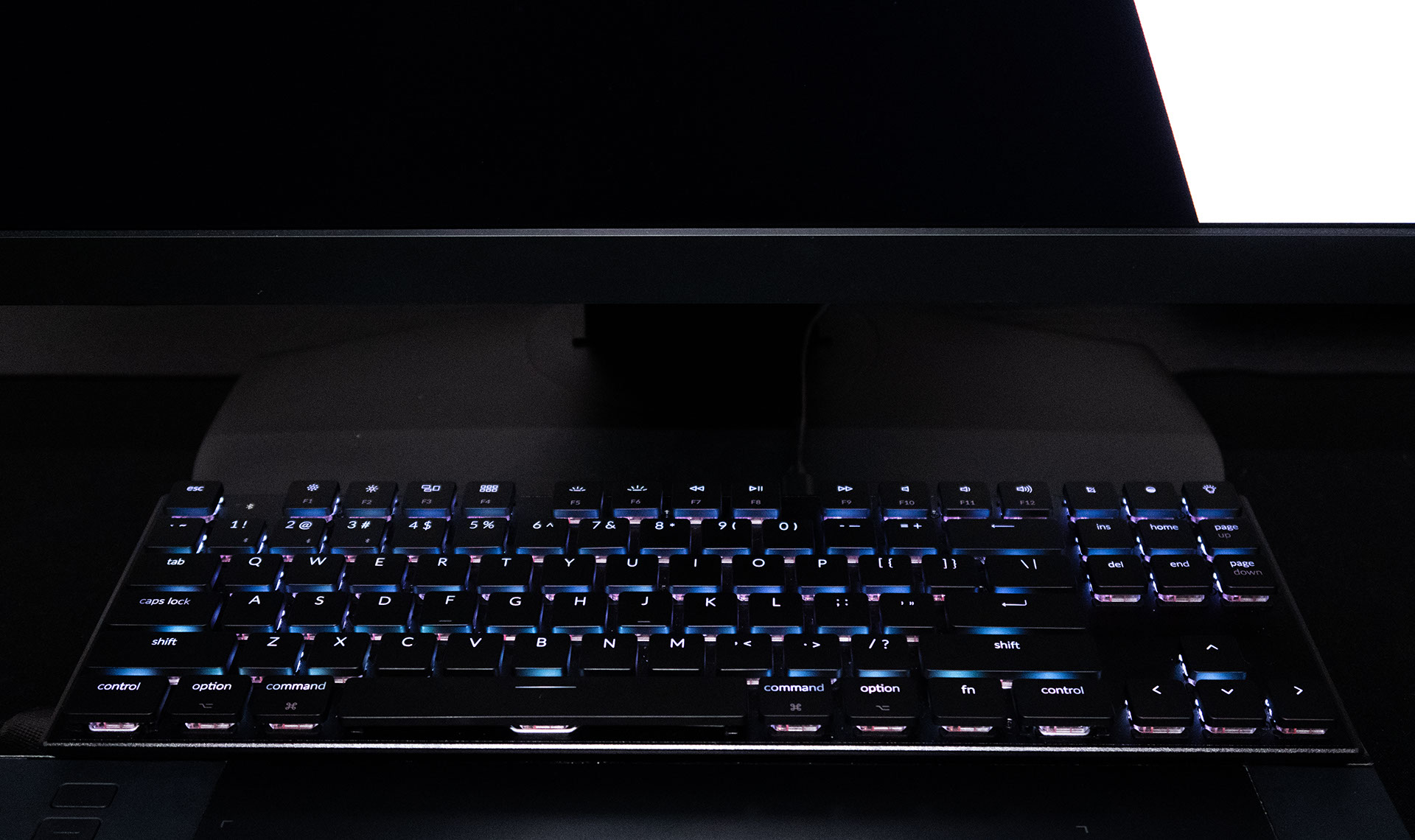
Eventually, someone on Reddit recommended the Keychron K1 v3, the lowest-profile mechanical keyboard available. It’s an off-the-shelf product, not a limited or custom-made model. There is a version with a numeric keypad and the one I wanted without it—the 75% layout. You can also choose red or blue Gateron switches. Both are low-profile switches with 2.5 mm of travel, noticeably shorter than their full-size counterparts. I chose the reds, which are much quieter and smoother.

This is absolutely not an alternative to good mechanical keyboards with full-size Gaterons or other MX switches. Comparing it with them makes no sense whatsoever. It’s an alternative to the Magic Keyboard, which is exactly what I wanted. I was moving from a keyboard I had owned for nearly ten years: the battery-powered Magic Keyboard, not the later version with a built-in rechargeable battery.

The Logitech K380 also used batteries, but fortunately the Keychron K1 has a rechargeable one. It’s supposed to last 15–38 hours depending on the backlighting. That was unacceptable to me, but since I could connect it with a cable, that’s what I did. I used the K1 over a cable with macOS and Windows, and over Bluetooth with the iPhone and iPad. Switching is easy: move one switch on the front edge of the case and you’re done, with an additional Fn + 1, 2, or 3 shortcut if you need to select the active device. A second switch changes between macOS/iOS and Windows/Android modes. In Windows, I use the Mac layout for typing. The function keys behave differently, but Option/Alt remains physically in the same place as on the Mac, so I can type without changing my habits or remapping anything. The box also contains keys with Windows labels, but for obvious reasons I didn’t install them.


The price also differs from that of good mechanical keyboards. The Keychron K1 is inexpensive: $79 bought a keyboard in a solid metal case with RGB lighting, wireless connectivity, and the option to switch to a cable at any time. I searched enough of the internet to make sure that finding this many features in a keyboard like this was extraordinary. I don’t know whether the red switches were the right choice. The blues would certainly be unacceptably loud for me, and I don’t want to wake the neighbors with my keyboard ¯\_(ツ)_/¯. On the other hand, music would cover some of that noise, and the blue switches feel more like typical mechanical ones. One thing is certain: even the low-profile red Gaterons are the best switches I’ve ever had in one of my own keyboards, including all kinds of Logitech and Apple models.
RGB backlighting
You can choose the RGB version or a model with white LEDs that costs $10 less.

I didn’t care much about backlighting, although I love the mode in which it stays off and briefly illuminates only the keys you press. Of course, lighting like that serves little practical purpose, but for the moment it’s enjoyable to look at ¯\_(ツ)_/¯. There are normal modes as well, plus several rainbow effects that shimmer so aggressively that using the computer becomes impossible because the keyboard is so distracting. Anyone who has the RGB lighting typical of gaming equipment everywhere will be delighted. I also recorded a video showing how the Keychron K1’s backlighting can behave.
The keyboard occasionally wobbles in the video because it was sitting unevenly between the monitor stand and the tablet. Normally, it can’t move at all. The backlight is set to its minimum brightness; near the end I switch to a higher level:
I sometimes enable a solid color—white or… orange. I never would have guessed that this particular keyboard color would appeal to me. The switch color affects the keyboard’s final appearance, because when you view it at an angle, the LEDs illuminate the switches and make them visible.
Importantly, you don’t have to configure the RGB every time because the keyboard remembers what you selected after a computer restart. It briefly runs an animated test rainbow, but moments later everything returns to its previous state. The red switches operate much more gently than Apple’s. They depress smoothly rather than suddenly giving way at one point. You feel the difference most clearly when you use only the Keychron for a week and then return to the Magic Keyboard. Unfortunately, the Smart Keyboard also stopped impressing me with the feel of its keys, but that doesn’t mean I never wanted to use it again, and I certainly wasn’t going to carry the Keychron around for writing on an iPad away from home.
Real mechanical keyboards
I had never understood how anyone could enjoy long key travel, so I wanted as little as possible. After the Keychron arrived, I decided to learn proper touch typing instead of continuing to use a few fingers and hit the correct keys through luck rather than skill. Once I began trying to type “properly,” I think I finally understood the fuss over long-travel keyboards that cost as much as a good processor. If I continued typing as I had before, I wouldn’t accept long travel for anything in the world. I hoped, however, to learn to type properly and quickly. If I succeeded, perhaps one day I would own two keyboards: the Keychron K1 for everything, including gaming, plus a Rama or some other conventional mechanical keyboard as a dedicated writing machine. I would probably never accept the enormous, extremely unergonomic height typical of most mechanical keyboards, though. I don’t mean the key travel, but the entire construction. My keyboard has to be low, preferably low enough not to need a wrist rest. That’s also why moving to the Keychron K1 felt so intuitive. The Option key was shifted relative to my previous keyboards, which lacked Delete, Home, and similar keys, so I had to adjust the position of my finger when typing Polish characters. I also assigned Option to Caps Lock as a precaution.
The search for an Apple Magic Keyboard replacement is over
After two years, I considered my search for a keyboard complete. The Keychron K1 was everything I had wanted and more. Versions 1 and 2 had problems that v3 eliminated. For example, the sound of a key being pressed sometimes occurred at a different moment from the keyboard registering the input. My only concern was the durability of the keycaps, which apparently wasn’t impressive. This was also the first time in my life that I updated a keyboard’s firmware. The update added new shortcuts with further lighting controls, the ability to lock the lighting, and other options.